Modern keyboard collecting isn’t about longevity. It’s about acquisition. Buy a board, use it for six months, get bored, buy another one. The hobby shifted from maintaining machines to accumulating them.
I came from a different era. 286, 386, 486 machines, computers that were tools, not toys. Keyboards back then were built with the same intent: IBM Model M boards that weighed more than modern laptops and lasted decades. Those weren’t consumer products. They were engineering equipment that happened to be available for purchase.
Today’s mechanical keyboard scene flipped that. Keyboards went from elitist machines (expensive because they were built to survive professional use) to showboating machines (expensive because they look good on camera). The focus moved from “how long will this last” to “how many can I collect.”
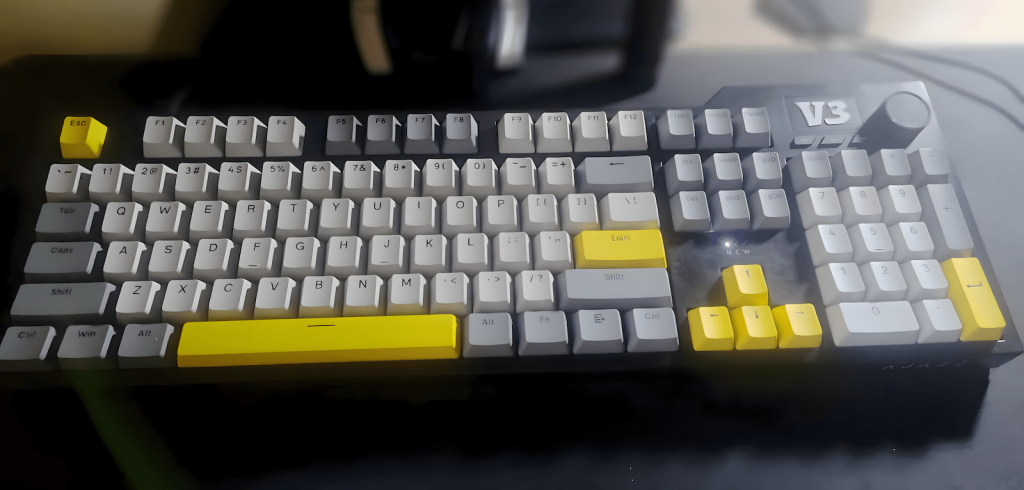
I’m not interested in that version of collecting. I use an Ajazz AK35i V3 the plain version, no screen, no unnecessary features. It’s a full-size board because I actually use the numpad, function row, and navigation cluster. And when I say I “collect” keyboards, what I mean is: I keep them running longer than they’re supposed to.
Common Mechanical Keyboard Problems (And How to Fix Them)
Most people replace keyboards because they think they’re broken. They’re usually not. They’re just dirty, misaligned, or worn in ways that are completely fixable.
Keycap Shine and Wear: How to Clean and Restore Them
ABS keycaps get shiny after months of use. Oil from your fingers breaks down the texture. PBT keycaps resist this longer but still wear eventually.
The fix: Clean keycaps with warm water and dish soap every few months. Pull them off (get a keycap puller if you don’t have one), soak them for 10 minutes, scrub with a soft brush, rinse, and let them air dry completely before reinstalling. This removes the oil buildup that causes shine and keeps legends readable.
If keycaps are genuinely worn through, replace them. Full keycap sets are $20-50 depending on material. PBT lasts longer than ABS. Dye-sublimated or double-shot legends won’t fade like pad-printed ones.
Fixing Stabilizer Rattle (Spacebar, Shift, Enter Keys)
Stabilizers are the metal bars under large keys (spacebar, shift, enter, backspace). When they rattle or stick, the whole typing experience feels broken. Most people assume the keyboard is defective. It’s usually just unlubricated or misaligned stabilizers.
The fix: Remove the keycaps over the stabilizers. You’ll see the wire mechanism. Use dielectric grease (or any thick lube designed for stabilizers) on the contact points where the wire meets the housing. Don’t over-lubricate. Too much grease attracts dust and makes keys mushy. Reassemble and test. If the rattle persists, check if the stabilizer housing is clipped in properly. Sometimes the wire pops out slightly and just needs to be reseated.
Inconsistent Switch Response: Keys Not Registering or Double-Typing
Switches stop registering or double-tap after heavy use. Dust, debris, or worn contact points cause this. Most membrane keyboards die this way in a month or two of heavy typing. Mechanical switches are repairable.
The fix (for hot-swappable boards): Pull the switch out with a switch puller, blow compressed air into the housing, and reinsert. If the problem persists, replace the switch. Individual switches cost $0.20 to $0.50 depending on type. You don’t need to replace the whole board.
The fix (for soldered boards): If you don’t want to desolder, you can sometimes fix sticky switches by removing the keycap, pressing the switch repeatedly to dislodge debris, and using compressed air. If that doesn’t work, the switch needs to be desoldered and replaced. This requires a soldering iron and basic soldering skills, but it’s not complicated, just tedious.
Cable Wear and Connection Issues
USB-C and Micro-USB ports fail from repeated plugging/unplugging. Cables fray at the connector. Wireless boards lose charge capacity after a year of daily use.
The fix: For detachable cables, just replace the cable. USB C to USB A cables are $5 to $15. Coiled cables look nice but aren’t more durable, they’re aesthetic. For built-in cables that fray, you can either desolder the old cable and solder a new one (if you’re comfortable with that) or just accept that the board is now permanently wired and manage the cable carefully.
For wireless boards with dying batteries, some can be opened and have their batteries replaced. Check if your model uses a standard lithium-ion cell. If it’s proprietary or glued in, replacement is harder, but it’s still possible with the right tools.
Dust and Grime Buildup
Dust under the keycaps affects switch actuation. Crumbs, hair, and particulate matter get into the gaps and cause uneven key travel.
The fix: Remove all keycaps once every 3 to 6 months. Use compressed air to blow out debris. Wipe the plate and PCB with a microfiber cloth lightly dampened with isopropyl alcohol (90% or higher). Let it dry completely before reassembling. This isn’t complicated maintenance, it’s just something nobody does until the keyboard stops working.
Why Full-Size Boards Make This Easier
Compact keyboards (60%, 65%, 75%) are trendy, but they complicate maintenance. Function layers mean you’re using certain keys more often than on a full-size board, which accelerates wear on specific switches. Navigation clusters and numpads distribute typing load across more keys.
Full-size boards also have more standardized layouts. Replacement keycap sets fit without modification. Stabilizers are easier to access. The case has more room to work inside if you need to open it for deeper cleaning or repairs.
I use the Ajazz AK35i V3 because it’s a full-size board that doesn’t lock me into proprietary parts. Hot-swappable switches mean I can replace individual switches without soldering. Standard layout means I can find replacement keycaps anywhere. No software dependency means the board will work in 10 years even if Ajazz stops supporting it.
What “Collecting” Should Actually Mean
The keyboard hobby became about buying, not maintaining. People own 5–10 boards and rotate between them, which means none of them get enough use to actually need maintenance. That’s not collecting, that’s hoarding with better aesthetics.
Real collecting means understanding what you have. If you own an IBM Model M, you should know how to take it apart and service its core mechanism before putting it back together properly. If you own a modern hot-swap board, you should know how to replace switches and stabilizers. If you own a vintage Alps board, you should know how to restore sliders and deal with worn springs.
Collecting without maintenance is just consumption. And consumption doesn’t build skill or understanding, it just fills space.
I’m not against owning multiple keyboards. But if you can’t keep one board running for five years, owning ten boards won’t make you better at the hobby. It just means you’ll replace ten boards instead of one.
The Brands That Build for Longevity (And the Ones That Don’t)
Some manufacturers still build keyboards that are meant to last:
Leopold, Filco, Varmilo are premium build quality, standard layouts, no gimmicks. These boards cost $120 to $200, but they’re designed to survive a decade of use.
Ducky has solid construction, replaceable parts, no proprietary dependencies. Mid to high price range ($120 to $180), but the build quality justifies it.
Keychron offers hot swappable switches, standard layouts, affordable pricing ($60 to $200 depending on model). Keychron boards are repairable without special tools.
Ajazz, Royal Kludge, Redragon are budget friendly but surprisingly durable. Not premium materials, but they use standard switches and keycaps, which makes them repairable. My Ajazz AK35i V3 falls into this category.
Some brands make boards that are harder to maintain:
Razer, Corsair, Logitech use proprietary switches, non-standard layouts, software dependency. These boards work well out of the box, but when something breaks, you’re replacing the whole unit or dealing with warranty claims. Razer’s optical switches can’t be replaced with standard mechanical switches. Corsair’s bottom row uses non-standard keycap sizes. Logitech’s low profile switches aren’t compatible with standard keycaps.
That doesn’t mean these brands make bad keyboards, just that they’re not designed to be user serviceable. If you want a board that lasts through maintenance rather than replacement, avoid proprietary ecosystems.
The Real Reason to Keep Keyboards Running Longer
It’s not about saving money. Replacing a $50 board every two years costs the same as maintaining a $100 board for five. The difference is understanding.
When you take apart a keyboard, clean the switches, replace a stabilizer, or swap out a worn keycap, you learn how the machine works. That knowledge carries over to other tools, other systems, other engineering problems.
The old computing era with 286, 386, 486 machines forced you to understand the hardware because software couldn’t compensate for broken components. If your keyboard didn’t work, you opened it and fixed it. If your PC didn’t boot, you traced the issue through the POST sequence. That mindset is mostly gone now, replaced by “just buy a new one.”
Mechanical keyboards are one of the last consumer electronics where that old mindset still applies. You can still open them, repair them, modify them, and keep them running long past their intended lifespan.
That’s what makes them worth collecting. Not the RGB. Not the custom keycaps. Not the number of boards you own.
The fact that you can still fix them yourself.

Treats hardware as equipment, not collectibles. Keeps tools running longer than their design lifespan by understanding how they fail, how they wear, and how to fix them instead of replacing them.
Runs HobbyEngineered, a site for people who still open things up, clean them, tune them, and expect tools to earn their keep over years not months. Also writes about real-world QA systems at QA Journey and practical, no-hype AI usage at Engineered AI.
Same systems mindset, different hardware layers.