You know that moment when you plug your phone charger into an outlet and it charges suspiciously slowly? Or when you’re staring at a drawer full of batteries wondering which ones are actually dead and which ones just need a second chance? That’s when a multimeter stops being a tool for electronics nerds and becomes genuinely useful for normal people.
I’m not going to teach you how to build circuits or diagnose complex electronics. What I’m going to show you is how to use a multimeter for the stuff you actually care about: figuring out why some outlets in your house are weird, whether that battery is dead, and basic troubleshooting that’ll save you money and frustration.
Analog vs Digital: Does It Actually Matter?
Before we dive in, let’s address the elephant in the room: should you get an analog or digital multimeter?
Digital multimeters have an LCD screen that shows you exact numbers. They’re what most people use today, and for good reason. You get precise readings like 118.3V or 1.47V without having to squint at a needle or do mental math. They’re also more durable since there’s no delicate movement mechanism to break. A decent digital multimeter costs anywhere from $20 to $50 for hobbyist use, and that’s all you need.
Analog multimeters have a needle that moves across a scale. They look vintage and cool, but here’s the truth: unless you’re specifically trying to watch voltage fluctuations in real time (the needle moves faster than most digital displays update), there’s almost no practical reason to choose analog for household tasks. They’re harder to read, less accurate, and more fragile.
For testing outlets, checking batteries, and general troubleshooting? Go digital. You’ll thank yourself every time you don’t have to figure out which scale to read or whether that needle is pointing at 1.5V or 1.6V.
Testing Outlets: Why Your House Has Weird Voltage Issues
This is probably where most people first realize they need a multimeter. You’ve got outlets all over your house, and somehow they’re not all created equal.
How to Test an Outlet Safely
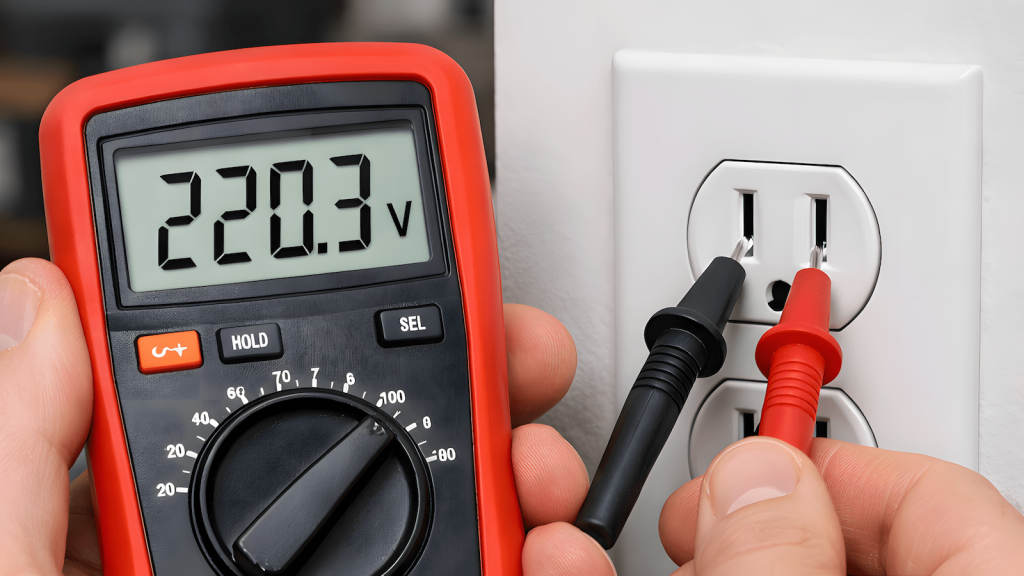
First, the basics. Set your digital multimeter to AC voltage (usually marked as V~ or VAC). Most countries have standardized voltage, but what you’re expecting to see depends on where you live and what type of outlet you’re testing.
Insert the black probe into the COM (common) port on your multimeter and the red probe into the port marked V or VΩ. Then carefully insert the probes into the outlet slots. For outlets with horizontal and vertical slots, test between the appropriate terminals based on your local wiring standards.
Here’s what’s normal for different systems. Standard North American outlets should read 110 to 125V, with most reading between 118 and 122V. Standard Philippine and most international outlets should read 220 to 240V. My house has both 110V and 220V outlets for different purposes, which is an uncommon setup.
Here’s what you’re looking for on a 220V outlet. At 230V you have clean power, good utility supply, and no voltage drop. At 220V everything is normal and fine. At 218V or below something’s not right. It could be load on the circuit, loose connections, or poor utility supply.
Here’s what you’re looking for on a 110V outlet. At 122V you have clean power and good supply. Between 118V and 120V is normal operation. At 110V or below you have potential issues. At 130V you have a red alert and something is seriously wrong.
Understanding Clean Power
When electricians talk about clean power, they’re referring to voltage that’s stable and at or slightly above the nominal rating. The reason slightly higher voltage indicates clean power is because it shows there’s no voltage drop happening. Your utility company is delivering proper voltage, your wiring connections are tight, and there’s no significant load dragging the voltage down.
A Real World Voltage Disaster Story
Let me tell you about the time high voltage nearly burned my house down and how a multimeter saved the day.
My house has an uncommon electrical setup. Most houses here in the Philippines just have simple 220V throughout with a single fuse box. My father wired our house more like a commercial building. We have both 110V and 220V outlets, proper circuit breakers, and everything isolated. Lighting is on separate circuits from convenience outlets. Front and rear outlets are separated. First floor and second floor are on their own circuits. The attic has its own line. Even the fridge and AC are on dedicated circuits. It’s rare to find residential wiring like this.
Because I have this mix of outlets and most of my appliances have auto switching power supplies (they can handle anything from 110V to 240V), I never noticed anything was wrong. Everything just worked.
Then I plugged in a device that was designed for true 220V. No auto switching, just straight 220V. I immediately noticed it was running weak. That’s when I grabbed my multimeter and started testing outlets systematically. I found several issues.
The 218V problem was that some of my 220V outlets were reading 218V instead of the expected 220 to 230V. For auto switching devices, that 2V difference doesn’t matter because they compensate automatically. But for a true 220V device? It’s noticeable. The low voltage indicated something in my electrical system wasn’t right.
The 130V disaster came when I found a 110V outlet reading 130V. That’s 20V over what it should be, way outside acceptable tolerance. That overvoltage killed my drill’s battery charger. Just fried it. The charger got hot, made a weird smell, and died.
That dead charger was actually a blessing in disguise. It forced me to investigate, and that’s when I noticed the sparks.
Why Some Outlets Spark and When to Worry
First, let’s clear something up. Small sparks when plugging things in are completely normal. You’re connecting to a live outlet, and as the plug gets close enough to the contacts, electricity jumps the tiny gap before physical contact is made. This is called arcing, and it happens every single time you plug something in. You just don’t always see it.
The key is the color of the spark.
Blue sparks are normal and safe. These are just electrical arcs from the current jumping that tiny gap. They should be small, quick, and happen only at the moment of connection. If you see a brief blue flash when plugging something in, that’s just your outlet doing its job.
Orange, yellow, white, or red sparks mean danger. These colors indicate something is burning or overheating, not just normal electrical arcing. Orange sparks mean there’s heat involved, often from resistance in loose connections causing metal or insulation to combust. The bigger and more frequent these colored sparks are, the more dangerous the situation.
In my case, the sparks started blue and normal, but became more frequent and started showing orange color. That’s when I knew something was seriously wrong. Every time I plugged something into that 130V outlet, I’d get sparking. Not the normal tiny blue spark. These were frequent, more substantial, orange tinged sparks.
I killed the breaker, pulled the outlet cover, and found exactly what you’d expect. Loose wires. The connections had worked themselves loose over time, creating resistance. That resistance was causing the voltage irregularities (the 130V reading) and generating heat. The arcing was getting worse as the connection deteriorated.
If I hadn’t caught it, those loose connections could have eventually sparked a fire inside the wall.
The Hidden Danger of Auto Switching Power Supplies
Here’s something most people don’t realize. Modern electronics with auto switching power supplies (100 to 240V) can mask serious electrical problems in your house.
I had 220V outlets reading 218V and a 110V outlet reading 130V. My phone chargers worked fine. My laptop worked fine. My TV worked fine. Everything with an auto switching power supply just adapted and kept working. I had no idea anything was wrong.
It wasn’t until I plugged in a true 220V device (something designed specifically for 220V with no voltage regulation) that I noticed the performance issue. The device ran noticeably weaker because it wasn’t getting the voltage it needed.
This is why testing your outlets with a multimeter is important even if everything seems to work. Auto switching power supplies are doing you a favor by compensating for bad voltage, but they’re also hiding problems that could indicate loose connections, overloaded circuits, or failing wiring. A 218V reading might not stop your laptop from charging, but it tells you something in your electrical system isn’t quite right and needs investigation.
If you have multiple types of outlets in your house, whether it’s different voltage ratings or just outlets in different rooms, test them all. Don’t assume everything is fine just because your devices work.
The Slow Charging Mystery
This is where voltage testing gets really practical. You plug your phone into one outlet and it charges fine. You plug it into another outlet and it crawls along at 10% per hour. What gives?
Grab your multimeter and test both outlets. If the slow charging outlet is reading significantly lower voltage (like 105V instead of 120V on a 110V system, or 218V instead of 220V on a 220V system), you’ve found your culprit. Low voltage means less power delivery, which means slower charging.
Common causes include long wire runs. Outlets far from your electrical panel naturally experience some voltage drop. Overloaded circuits are another cause. If you’ve got a space heater, a microwave, and your phone charger all on the same circuit, voltage can sag. Most houses here in the Philippines have very simple wiring. Everything is on one or two circuits with a single fuse box. My father went way beyond standard residential practice and wired our house like a commercial building. Lighting is on separate circuits from convenience outlets. Front and rear outlets are isolated. First and second floor are on their own circuits. The attic has its own line. The fridge and AC each have dedicated circuits. We have a proper multi circuit breaker panel. This kind of setup is very uncommon in Philippine homes. The benefit is that one heavy load never affects everything else. When the AC kicks on, the lights don’t dim.
Loose connections are the dangerous cause. A loose wire connection creates resistance, which drops voltage and generates heat. This is what caused my 218V reading and the 130V disaster that eventually led to frequent sparking.
If you consistently get low voltage from an outlet, especially if it’s more than 5 to 10V below what you expect, call an electrician. That’s not a know enough to be dangerous fix. That’s a fire hazard.
And if you get high voltage, like that 130V I measured on what should have been a 110V outlet, don’t wait. That’s an emergency. High voltage will damage or destroy electronics (RIP to my drill charger), and it indicates a serious wiring problem that needs professional attention immediately.
The kicker? Even with good electrical planning like my father’s setup (proper isolation, dedicated circuits, quality breakers), stuff can still go wrong. Connections loosen. Wire nuts work themselves free. Outlets wear out. Regular testing with a multimeter can catch these problems before they become expensive or dangerous.
Battery Testing: Separating the Dead from the Resting
You’ve got a junk drawer. In that drawer, there’s a pile of batteries. Some are dead. Some might work. Some are the ones where you think you just took this out of the package. Time to find out.
How to Test Batteries
Set your multimeter to DC voltage (marked as V with a straight line or VDC). Touch the red probe to the positive terminal and the black probe to the negative terminal.
Here’s what you’re looking for.
For AA and AAA alkaline batteries, fresh batteries read 1.5V to 1.6V. Usable batteries read 1.3V to 1.5V. Questionable batteries read 1.0V to 1.3V and might work in low drain devices like remotes. Dead batteries read below 1.0V.
For 9V batteries, fresh batteries read 9.0V to 9.5V. Usable batteries read 7.5V to 9.0V. Dead batteries read below 7.0V.
For car batteries (12V), healthy batteries read 12.6V to 12.8V with the engine off. Batteries that need charging read 12.0V to 12.4V. Probably dead batteries read below 12.0V.
For rechargeable NiMH batteries, fresh batteries read 1.35V to 1.4V (they run lower than alkaline). Usable batteries read 1.2V to 1.35V. Dead batteries read below 1.0V.
The Catch: Voltage Isn’t Everything
Here’s the part where know enough to be dangerous becomes important. A battery can show good voltage and still be useless.
Why? Because a multimeter with its high internal resistance draws almost no current from the battery. A battery might read 1.5V on your multimeter but immediately drop to 0.8V when you actually try to use it in a device. This happens when the battery’s internal resistance is too high. It’s like trying to drink a thick milkshake through a tiny straw.
For most casual battery testing, voltage is good enough. If a battery reads low voltage, it’s definitely done. If it reads good voltage, it’s probably fine. But if you really want to know if a battery can deliver power under load, you need a battery tester that actually draws current, or you need to test under load (which is beyond basic multimeter usage).
The Don’t Die or Break Your Meter Rules
Multimeters are generally safe, but you can absolutely hurt yourself or destroy your meter if you’re careless. Here are the rules.
Probe Placement Matters
Your multimeter has at least two or three ports for probes. COM (common) is where the black probe always goes. V, VΩ, or just V is where the red probe goes for voltage and resistance. A or mA is where the red probe goes for current measurements.
The most common mistake is leaving the red probe in the current (A) port while trying to measure voltage. If you do this across a power source, you’re basically short circuiting it through your multimeter’s low resistance current shunt. You’ll blow the fuse inside your meter, or worse, create a dangerous arc.
Always double check which port your red probe is in before testing anything.
Understand What the Fuse Protects
Most multimeters have an internal fuse that protects the current measuring circuit. If you accidentally short circuit something while in current mode, the fuse blows instead of destroying the meter’s internals.
Here’s the thing. That fuse doesn’t protect you. It doesn’t protect against you touching both probes while measuring 120V. It’s there to protect the meter’s electronics, not to keep you safe. Don’t get cocky just because there’s a fuse in there.
Respect Outlet Testing
When testing outlets, you’re dealing with enough voltage and current to kill you. Keep both hands on the probes, don’t touch the metal parts of the probes, and if your probes are damaged or exposing bare metal near the tips, replace them.
Also, if your multimeter is rated for CAT II 300V or similar, that’s telling you it’s designed for testing household outlets. Don’t use a cheap meter that doesn’t have a CAT rating for testing mains voltage. Spend the extra $10 and get one that’s properly rated.
When Cheap Meters Are Fine and When They’re Not
A $20 multimeter from Amazon will handle testing batteries, checking outlet voltage, continuity testing for cables, and basic hobby electronics.
Don’t trust a cheap meter for anything involving high voltage in industrial settings, precision work where 0.1V actually matters, or professional electrical work where your safety depends on accuracy.
For hobbyist purposes, a basic Fluke meter or even a well reviewed generic brand is perfectly fine. You don’t need a $300 meter to figure out if your AA battery is dead.
Other Actually Useful Things You Can Check
Continuity Testing for Bad Cables
Set your multimeter to the continuity mode (usually marked with a diode symbol or a sound wave icon). Touch the probes together. You should hear a beep. That’s the meter telling you there’s a complete circuit with low resistance.
This is perfect for testing cables. Plug one probe into each end of a cable and you should hear a beep if the cable is good. No beep? The cable is broken somewhere inside.
You can also test extension cords, phone charging cables (test each wire), headphone cables, and any wire where you suspect a break.
Finding Voltage Drop
If you’ve got a long extension cord and you’re wondering if it’s losing voltage along its length, test the voltage at the source outlet, then test it again at the end of the extension cord while something is plugged in and running. The difference is your voltage drop.
Significant voltage drop (more than a few volts) means the extension cord is too thin for what you’re running through it, or it’s too long, or both.
What This Guide Won’t Teach You
I’m deliberately not covering current measurement in detail, because that’s where dangerous stops being cute and starts being dangerous. Measuring current requires you to break a circuit and insert the meter in series, which means you need to understand circuit topology. Get it wrong and you can create a short circuit that destroys your meter, damages equipment, or starts a fire.
I’m also not covering resistance measurement in depth because, honestly, most hobbyists never need it for household tasks. It’s useful for electronics work, but that’s a different article.
The Bottom Line
A multimeter is one of those tools that seems complicated until you realize 90% of what you need it for involves exactly two things: measuring voltage and testing continuity. You don’t need to understand Ohm’s Law. You don’t need to build circuits. You just need to know how to check if electricity is where it should be and how much of it there is.
Get a digital multimeter. Learn to test outlets and batteries. Use continuity mode to find broken cables. And always, always check which port your red probe is in before you touch anything.
That’s enough knowledge to be dangerous, in the best possible way.

Learned multimeter basics the hard way: through a fried drill charger, orange sparks, and loose wiring that could’ve burned the house down. Treats electrical troubleshooting the same way he treats systems, methodical testing beats assumptions every time.
Runs HobbyEngineered, where tools are judged by real-world use, not marketing specs or YouTube hype.
Also writes about QA systems at QA Journey and cuts through AI hype at Engineered AI.
Same engineer mindset, different tools.