The mechanical keyboard market has a dirty secret: most of the improvement in feel, sound, and build quality happened at the $40–$80 price point over the last three years. You no longer need to spend $150 to get a keyboard that does not rattle, flex, or feel hollow. You do, however, need to know which budget boards are genuinely good and which ones are trading on marketing photos.
This list covers mechanical keyboards under $100 that are worth buying for gaming with honest notes on where each one cuts corners, because they all do somewhere.
Quick-Pick Comparison Table
| Pick | Product | Form Factor | Switches | Wireless | Price |
|---|---|---|---|---|---|
| Best Overall Under $50 | Redragon K552 | TKL | Outemu Red/Blue/Brown | No | ~$35 |
| Best Under $100 | Keychron K2 V2 | 75% | Gateron Red/Blue/Brown | Yes | ~$90 |
| Best Wireless Budget | Royal Kludge RK68 | 65% | RK Red/Blue/Brown | Yes | ~$50 |
| Best Full-Size with Numpad | Ajazz AK35i V3 | 100% | Sea Salt Linear | No | ~$70 |
| Best Hot-Swap | Keychron C3 Pro | TKL | Gateron G Pro Red | No | ~$45 |
Before You Buy Wireless: A Reality Check
If you are on a desktop, wireless keyboard and mouse is a solution to a problem you do not have. You are already sitting at a desk. The cable runs behind it, under it, through a cable channel, it disappears in ten minutes and stays gone. You gain nothing from wireless except a battery to charge, a dongle to lose, and latency you paid extra for.
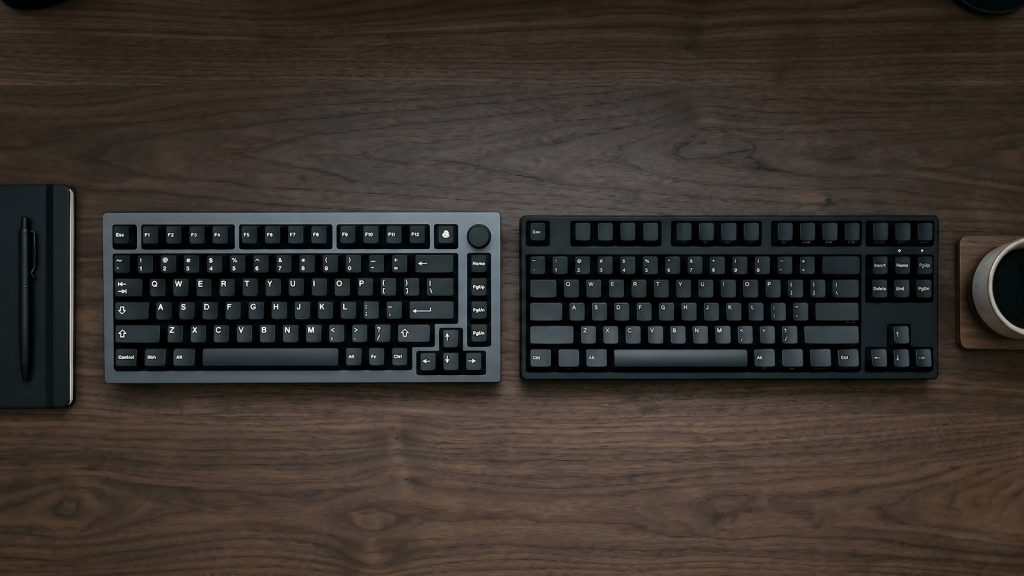
The keyboard community has spent years convincing people that compact and wireless is the aspirational setup. Most of it is Instagram furniture boards that look clean in a photo and feel like a compromise every day you actually use them. TKL cuts your numpad. 65% cuts your arrow keys. 60% cuts your function row. Every cut is a feature you will eventually miss, usually mid-game or mid-spreadsheet.
If you are buying for a desktop, buy wired. Buy full-size if you use the numpad. Buy what works for your hands, not what performs well in a desk tour video.
The wireless picks on this list exist because some people genuinely need them laptop users, multi-device switchers, people who move between setups. If that is you, they are solid. If it is not, scroll past them.
Prices are approximate. Always check current Amazon listings for deals and availability.
What to Expect (and Accept) at the Budget Tier
Budget mechanical keyboards have gotten very good at the things that matter for gaming: switch feel, actuation consistency, and polling rate. They have gotten less good at build materials (more plastic, less aluminum), software (clunky or absent), and acoustics out of the box most benefit from foam modding or switch lubing, neither of which you should have to do at this price.
If you are coming from a membrane keyboard, any mechanical on this list will feel like an upgrade. If you are coming from a $200+ board, you will notice the difference in how the case sounds when you bottom out keys. Manage that expectation and the value proposition is clear.
Best Budget Mechanical Keyboards for Gaming
Best Overall Under $50: Redragon K552
The K552 is the entry point that holds up under scrutiny. It uses Outemu switches not Gateron or Cherry, but surprisingly consistent for the price and comes in red, blue, and brown variants. The TKL form factor gives your mouse more room without removing anything you actually use during gaming. Build quality is full plastic but the case does not flex noticeably under normal use. The main compromise is the proprietary USB connection; if the cable goes, replacements are not universal.
Best Under $100 — Sweet Spot Pick: Keychron K2 V2
The K2 V2 is one of the most recommended keyboards in this price range and it earns it. The 75% layout keeps the function row and arrow keys in a compact footprint, Gateron switches are smooth and consistent, and wireless via Bluetooth 5.1 actually works without lag during gaming when paired correctly. The aluminum frame option (available at a slight premium) is a noticeable step up in feel from plastic-framed competitors. The Keychron software is basic but functional. If you only buy one board at this price, this is the safest pick.
Best Wireless Budget Mechanical: Royal Kludge RK68
The RK68 hits wireless mechanical at a price point that was not possible two years ago. It connects via 2.4GHz dongle or Bluetooth, covers up to three devices, and uses RK’s in-house switches which are smooth enough for gaming without lubing. The 65% layout is compact and takes some adjustment if you are used to a full board, but mouse clearance is excellent. Battery life is solid at around 4,000 mAh. The RGB software is limited; if deep lighting customization matters, this is not the board for it.
Best Full-Size with Numpad: Ajazz AK35i V3
The keyboard hobby has a full-size problem: almost every “best budget mechanical” list pushes compact layouts because they photograph better and appeal to the desk-tour crowd. If you actually use the numpad for coding, QA work, data entry, spreadsheets, or gaming that needs it, you have been quietly ignored by most of these guides.
The Ajazz AK35i V3 is the full-size answer at around $70. 104 keys, gasket mount, five-layer sound dampening, hot-swap PCB, and Sea Salt linear switches that come pre-lubed from the factory. It is wired, which is the correct choice for a desktop board (see the callout above). After a year of daily use across gaming, typing, coding, and QA work, the kind of abuse that destroys most membrane keyboards in months and it still feels like new. The switches have not degraded, the case has not flexed, and nothing has needed replacing. For people who buy keyboards to use them rather than photograph them, this is the pick.
Best Hot-Swap Pick: Keychron C3 Pro
Hot-swap means you can pull switches out and replace them without soldering that is important if you want to experiment with switch types or upgrade later. The C3 Pro offers this at around $45, which makes it the easiest entry point into customizable mechanical keyboards. It ships with Gateron G Pro Reds, which are a legitimate switch at any price point. The board is wired only and the case is fully plastic, but for a first keyboard where you expect to swap things out over time, those trade-offs are reasonable.
Switch Types at a Glance
Linear switches (Red, Yellow) have smooth, quiet keystrokes with no tactile bump preferred by most FPS gamers for fast, consistent actuation. Tactile switches (Brown, Clear) have a bump you can feel mid-press without an audible click as a middle ground that works for both gaming and typing. Clicky switches (Blue, Green) have both the bump and an audible click which is satisfying to type on, less popular for gaming due to noise and slightly slower reset.
At the budget tier, Gateron switches are generally smoother than Cherry MX equivalents at the same price point. That is not a universal rule, but it holds often enough to mention.
What Budget Keyboards Usually Skip
Sound dampening is often the first thing reviewers complain about on budget boards. The hollow bottoming-out sound gets flagged as a flaw, and foam mods get recommended as a fix. Worth knowing about if acoustics genuinely matter to your setup but if you bought a clicky mechanical because you wanted the sound and feel of a mechanical keyboard, the hollow resonance is part of the character. Whether that bothers you is a personal call, not an objective defect.
Per-key RGB control is often replaced with zone lighting or preset patterns only. If full per-key customization matters, verify the software supports it before buying it as most budget boards do not.
USB-C cables are increasingly standard even at budget prices, but a few holdouts still use micro-USB. Check before buying if cable routing matters to your setup.
Frequently Asked Questions
Is a budget mechanical keyboard good enough for competitive gaming? For most players, yes. Switch actuation consistency and polling rate (1000 Hz is standard even at budget tier) are more important than build material for gaming performance. The premium you pay above $100 buys feel and acoustics, not competitive advantage.
Should I lube my switches on a budget keyboard? You do not have to, but it helps. Linear switches respond most noticeably to lubing. If you want the best possible feel without spending more, a pot of Krytox 205g0 and 30 minutes pays off.
What is TKL and do I need it? Tenkeyless means no numpad with a shorter footprint that gives your mouse more room. If you do not use the numpad for work or gaming, TKL is worth defaulting to.
Are budget keyboards loud? If you bought a clicky mechanical, Blue switches, Green switches, anything with an audible click, it’s loud by design. That is the point. Mechanical keyboards existed for decades as loud, satisfying, purposeful tools before the internet decided noise was a problem to solve. The spring and click mechanism is the whole experience.
If the noise bothers you, you bought the wrong switch type. Get linears or tactiles. But if you are sitting in a room where you can hear your neighbor’s dog, your microwave, your family moving around and the keyboard is somehow the noise problem then you are in the wrong room, not using the wrong keyboard.